Free Active Directory Reporting Tool
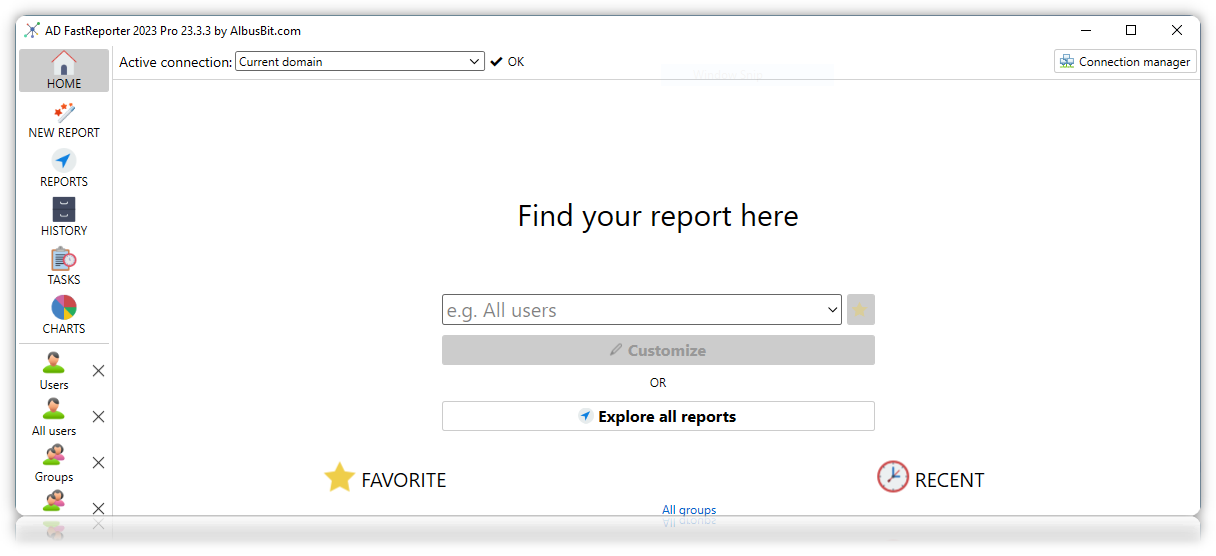
AD FastReporter is a free Active Directory reporting tool for Windows that lets you generate detailed reports on users, computers, groups, OUs, contacts, printers, Exchange, and Group Policy Objects — without writing a single line of PowerShell.
Many IT administrators rely on PowerShell scripts or manual ADUC lookups to pull information from Active Directory. This works for simple, one-off queries, but becomes time-consuming when you need to report on hundreds of users, compare group memberships, or check password policies across the domain. AD FastReporter provides a visual interface where you select a report, customize the fields you want to see, and generate results in seconds — all for free, with no time limit.
What You Get for Free
The free version of AD FastReporter is not a limited trial — it is a fully functional reporting tool that you can use indefinitely. Here is what is included at no cost:
250+ Built-in Report Forms
Ready-to-use reports across 8 categories: Users, Computers, Groups, Organizational Units, Contacts, Printers, Exchange, and Group Policy Objects. Find reports like "Disabled Users", "Group Membership", "Users with Password Never Expires", "Deleted Users", and many more — all pre-built and ready to generate.
370 Report Fields
Customize any report with fields from a library of 370 Active Directory attributes. Each field includes a description and its LDAP attribute name. All values are automatically converted to a human-readable format — no need to manually decode timestamps, SIDs, or byte arrays.
Multiple Domain Connections
Connect to more than one Active Directory domain from a single instance. Useful if you manage multiple forests or domains and need to pull reports from each without switching tools or re-authenticating.
Charts and Visualizations
Generate pie charts from 10 built-in data sources such as "User Accounts Created", "User Activity (Last Logon)", and "Group Account Types". Visualize your AD environment at a glance without building spreadsheets manually.
Why Use a Dedicated Reporting Tool Instead of PowerShell?
PowerShell is powerful, but writing and maintaining AD reporting scripts has real costs. A Get-ADUser one-liner is fine for quick lookups, but once you need to combine attributes from different object types, filter by nested group membership, or produce a readable report for a manager or auditor, scripts get complex fast.
With AD FastReporter, you get the same data without the scripting overhead. Search for a report by name, pick the fields you want, and click Generate. The results appear in a sortable grid that you can review immediately. This is particularly useful for IT administrators who need to respond to audit requests, onboard new team members who are not familiar with PowerShell, or simply save time on recurring reporting tasks.
See AD FastReporter in Action
Watch this overview to see how quickly you can generate Active Directory reports with the free version:
Free vs Pro — What's the Difference?
The free version covers the core reporting functionality. The Pro version adds export, automation, and customization features for teams that need to share or schedule reports regularly.
| Feature | Free | Pro |
|---|---|---|
| 250+ built-in report forms |  |
|
| 8 report categories | |
|
| Customize reports with 370 fields | |
|
| Multiple domain connections | |
|
| Charts and visualizations | |
|
| Export to CSV, Excel, PDF, XML, ODS, JSON, HTML |  |
|
| Scheduled and automated reporting | |
|
| Create custom report filters | |
|
| Custom report form creation | |
|
| Report storage and archive | |
|
| Additional Pro-only fields and reports | |
|
| Custom AD attribute fields | |
|
| Priority customer support | |
|
Need export, scheduling, or custom filters? See Pro pricing — one-time purchase starting at $149, no subscription. Or request a free 7-day Pro trial to test all features in your environment first.
System Requirements
AD FastReporter runs on Windows and requires .NET Framework. It connects to Active Directory using standard LDAP queries — no agents to install on domain controllers, no firewall changes needed. Just install on any domain-joined workstation or server and connect.
Frequently Asked Questions
Is the free version really free forever?
Yes. There is no time limit, no registration requirement, and no feature expiration. The free version remains fully functional for as long as you use it.
Do I need to provide an email address to download?
No. The free version downloads immediately with no registration. An email is only required if you request a Pro trial key.
Can I use the free version in a business environment?
Yes. The free version is licensed for both personal and commercial use.
What if I need to export reports to Excel or CSV?
File export is a Pro feature. You can request a free 7-day trial to test it, or copy data directly from the report grid in the free version.
Is this an open source tool?
AD FastReporter is not open source, but the free version is available at no cost with no restrictions on usage duration. It is developed by Albus Bit, a software company specializing in Active Directory management tools.
Download AD FastReporter Free
Get your Active Directory reports in minutes — no PowerShell, no registration, no cost.